
Title: Unraveling the Wonders of FTTH: Fiber-to-the-Home Explained
Understanding FTTH: The Future of High-Speed Internet
In today’s digital age, a reliable and fast internet connection is essential for both personal and professional activities. One of the most advanced technologies available for internet connectivity is Fiber to the Home (FTTH). This blog explores what FTTH is, its benefits, and why it is rapidly becoming the preferred choice for internet access.
What is FTTH?
Fiber to the Home (FTTH), also known as Fiber to the Premises (FTTP), is a broadband network architecture that uses fiber-optic cables to deliver high-speed internet directly to individual homes or businesses. Unlike traditional copper cables, which are prone to interference and signal loss, fiber optics transmit data using light signals, resulting in significantly faster and more reliable internet connections.
FTTH is considered the best solution for broadband connectivity, offering faster speeds and greater stability compared to other methods. Here’s how FTTH technology works:
- Direct Connection: FTTH connects optical fiber directly to residences, apartment buildings, and businesses.
- Optical Fiber Cables: These cables, made of thin strands of glass or plastic, transmit data as light signals. They run from the internet service provider’s (ISP) network all the way to the subscriber’s home.
- Data Transmission: Data is transmitted using light signals, enabling incredibly fast upload and download speeds with exceptional stability. Fiber-optic cables can handle large amounts of data over long distances without significant signal loss.
- Optical Network Terminal (ONT): At the customer’s home, the fiber-optic cable connects to an ONT, which converts incoming light signals into electrical signals.
- Signal Distribution: The electrical signals are then distributed throughout the home using Ethernet or other wired or wireless technologies.
FTTH is often deployed using Passive Optical Network (PON) technology, which naturally resists electromagnetic interference. This results in fewer network faults, higher system reliability, and lower maintenance costs. The primary devices used in FTTH include an Optical Line Terminal (OLT) at the ISP’s office and an ONT at the subscriber’s location.
FTTH significantly increases connection speeds compared to other technologies, offering speeds of up to 100 megabits per second (Mbps). It supports multiple services, including video, data, radio, and multimedia.
How Does FTTH Work?
FTTH networks consist of optical fibers that run from a central office directly to the subscriber’s premises. The key components of an FTTH network include:
- Optical Line Terminal (OLT): Located at the service provider’s central office, this device sends data signals through the fiber network.
- Optical Network Units (ONUs): Installed at the customer’s location, these units convert optical signals back into electrical signals for use by devices like computers and routers.
- Optical Distribution Network (ODN): This includes all the fiber cables that connect the OLT to the ONUs.
Benefits of FTTH
- Blazing Fast Speeds: FTTH provides incredibly high speeds, often reaching up to 1 Gbps or more. This allows users to stream high-definition videos, download large files, and engage in online gaming without lag or buffering.
- Reliability: Fiber-optic cables are less susceptible to environmental factors such as weather conditions or electrical interference, resulting in fewer outages and a more stable connection.
- Symmetrical Upload and Download Speeds: Unlike traditional broadband connections that often offer slower upload speeds, FTTH provides equal upload and download rates. This is particularly beneficial for users who frequently upload content or participate in video conferencing.
- Future-Proof Technology: As internet usage continues to grow, FTTH networks can be easily upgraded to support higher speeds and more users without significant infrastructure changes, making it a long-term investment for both service providers and consumers.
- Enhanced Security: Fiber-optic technology is inherently more secure than copper-based systems because it does not radiate signals that can be intercepted, making FTTH a safer option for transmitting sensitive information.
- Improved Smart Home Integration: With the rise of IoT devices, having a robust internet connection is crucial for the seamless operation of smart home technologies. FTTH can support multiple connected devices without compromising performance.
What are the Main Advantages of FTTH Over Traditional Broadband
Fiber to the Home (FTTH) technology offers several significant advantages over traditional broadband solutions such as DSL and cable. Here are the main benefits that make FTTH a superior choice for internet connectivity:
- Blazing Fast Speeds
FTTH provides much higher download and upload speeds compared to traditional broadband. Users can experience speeds exceeding 1 Gbps, which is ideal for streaming high-definition videos, online gaming, and large file downloads without interruptions. This speed advantage is due to fiber optic cables transmitting data using light signals, which travel faster than electrical signals used in copper cables. - Reliability
Fiber optic cables are less susceptible to interference from environmental factors like weather conditions or electromagnetic radiation. This results in a more stable internet connection with fewer outages and disruptions, ensuring consistent performance for users. Traditional broadband often suffers from signal degradation over distance, while FTTH maintains its quality regardless of the distance from the service provider. - Symmetrical Upload and Download Speeds
One of the standout features of FTTH is its ability to provide symmetrical speeds, meaning that upload speeds match download speeds. This is particularly beneficial for users who frequently upload content, participate in video conferencing, or engage in online gaming, as it allows for seamless performance across various applications. - Future-Proof Technology
FTTH is considered a future-proof solution because it can easily accommodate increasing bandwidth demands as technology evolves. As more devices connect to the internet and data consumption rises, FTTH networks can be upgraded with minimal modifications to support higher speeds and more users. This scalability makes it a long-term investment for both service providers and consumers. - Enhanced Security
Unlike traditional copper-based systems that can be easily tapped into, fiber optic cables are difficult to intercept without detection. This inherent security feature makes FTTH networks less vulnerable to hacking and other security breaches, providing peace of mind for users concerned about their data privacy. - Lower Latency
FTTH technology offers lower latency compared to traditional broadband solutions. Lower latency means faster data transmission times, which is crucial for applications requiring real-time responses, such as online gaming and video conferencing. This results in a smoother user experience overall. - Improved Smart Home Integration
With the rise of Internet of Things (IoT) devices, having a robust internet connection is essential for seamless operation of smart home technologies. FTTH can support multiple connected devices simultaneously without compromising performance, making it an excellent choice for smart home setups.
How Does FTTH Compare to 5G in Terms of Speed and Reliability?
When comparing Fiber to the Home (FTTH) and 5G in terms of speed and reliability, several key factors come into play. Here’s a detailed analysis based on current information:
Speed Comparison
- FTTH Speeds: FTTH can deliver maximum real-world speeds of up to 1 Gbps, with some advanced systems capable of reaching even higher speeds, theoretically up to 10 Gbps or more under optimal conditions. FTTH provides consistent speeds that are usually as advertised, allowing for symmetrical upload and download rates, which is beneficial for activities like video conferencing and online gaming.
- 5G Speeds: 5G networks also promise high speeds, with maximum theoretical speeds reaching up to 20 Gbps in ideal conditions. However, typical real-world speeds are often between 150 Mbps and 600 Mbps, depending on factors such as distance from the nearest cell tower and network congestion. Unlike FTTH, 5G speeds can vary significantly based on environmental conditions and user density in the area.
Reliability Comparison
- FTTH Reliability: FTTH is known for its high reliability due to its wired nature. Fiber optic cables are less susceptible to interference from environmental factors like weather or physical obstructions (e.g., buildings and trees). As a result, FTTH connections maintain consistent performance even during peak usage times, making it a dependable choice for users who require stable internet access for demanding applications.
- 5G Reliability: While 5G offers flexibility and mobility, its reliability can be affected by various factors. The performance of a 5G connection can degrade rapidly with distance from the cell tower, and physical barriers can obstruct signals. This variability means that users may experience slower speeds or interruptions, especially in densely populated areas where network congestion is common.
Latency
- FTTH Latency: FTTH typically offers lower latency (around 4.9 ms to 7.3 ms), which is crucial for real-time applications like online gaming and video conferencing. The low latency ensures quick response times, enhancing the overall user experience.
- 5G Latency: Although 5G has improved latency compared to previous mobile networks (averaging around 18 ms to 22 ms), it still cannot match the ultra-low latency provided by fiber connections. This difference can impact applications that require immediate responsiveness.
What Are the Main Limitations of 5G Compared to FTTH?
When comparing 5G technology to Fiber to the Home (FTTH), several limitations of 5G become apparent, particularly in terms of speed, reliability, and overall performance. Here are the main limitations of 5G compared to FTTH:
- Speed Consistency
- Variable Speeds: While 5G can theoretically achieve high speeds (up to 20 Gbps), real-world performance often falls short, typically ranging between 150 Mbps and 600 Mbps. This variability is influenced by factors such as distance from the cell tower, network congestion, and physical obstructions like buildings and trees.
- FTTH Advantage: FTTH provides more consistent and reliable speeds, often reaching up to 1 Gbps or more with symmetrical upload and download rates. This makes it ideal for bandwidth-intensive activities such as streaming and gaming.
- Reliability
- Susceptibility to Interference: 5G signals are more prone to interference from physical obstacles and environmental conditions (e.g., rain, wind). This can lead to connectivity issues, especially in urban areas where buildings can obstruct signals.
- FTTH Reliability: In contrast, FTTH is less affected by external factors due to its wired nature. Fiber optic cables provide a stable connection with minimal outages, making them a more reliable option for users who require consistent internet access.
- Latency
- Higher Latency: 5G networks typically exhibit higher latency (around 18 ms to 22 ms), which can impact real-time applications like online gaming and video conferencing. Although this is an improvement over previous mobile technologies, it still lags behind fiber connections.
- Lower Latency with FTTH: FTTH offers significantly lower latency (around 4.9 ms to 7.3 ms), making it preferable for applications that demand quick response times.
- Coverage Limitations
- Limited Availability: As of now, 5G networks are still in the early stages of deployment and are primarily available in densely populated urban areas. Many rural regions lack access to reliable 5G services.
- Wider Fiber Coverage: FTTH networks have broader coverage in many areas, although they can also be limited in rural settings. However, once installed, fiber networks tend to provide more consistent service across various locations.
- Operational Costs
- Higher Operational Costs for 5G: The operational costs associated with maintaining a 5G network can be significantly higher compared to FTTH due to the need for more base stations and equipment to manage the wireless signals effectively.
- Cost-Effectiveness of FTTH: Although the initial installation of fiber optics may be costly, FTTH generally offers lower long-term operational costs due to its durability and lower maintenance needs.
How Does the Response Time of 5G Compare to FTTH for Online Gaming?
For online gaming, Fiber to the Home (FTTH) generally offers a faster response time (lower latency) compared to 5G.
Response Time (Latency):
- FTTH: Typically offers very low latency, around 1 millisecond. Some sources quote latency as low as 4.9 ms to 7.3 ms.
- 5G: While designed for low latency, 5G’s latency is generally higher than FTTH. 5G latency can be around 4 milliseconds, though real-world averages range between 18 ms and 22 ms. Airtel claims that 5G networks are designed for latency as low as 1 millisecond, about 50 times faster than 4G.
The lower latency of FTTH makes it more suitable for applications requiring fast response times, such as online gaming and stock trading. The reduced jitter and faster input synchronization offered by fiber connections provide a better online gaming experience compared to ADSL, VDSL, 4G, and 5G. While 5G can be a viable option for casual or mobile gaming, serious gamers typically prefer fiber due to its low latency and high reliability.
Factors such as distance to the game server, internet traffic, and network equipment quality can impact latency for both connection types.
How Does the Upload Speed of 5G Compare to FTTH for Gaming?
When comparing the upload speeds of 5G and FTTH for gaming, FTTH generally offers significant advantages.
Upload Speeds:
- FTTH: Provides symmetrical upload and download speeds, meaning that the upload speed is equal to the download speed. FTTH can deliver upload speeds of up to 1 Gbps or more, with some advanced systems capable of reaching 10 Gbps or higher in optimal conditions. This high upload speed is particularly beneficial for online gaming, streaming, and content creation.
- 5G: Upload speeds for 5G vary significantly depending on frequency bands and proximity to the cell tower. Generally, 5G upload speeds range from about 10 Mbps to 100 Mbps, with typical real-world performance around 25 Mbps. While some high-band 5G networks may achieve faster speeds under ideal conditions, they still lag behind FTTH.
Implications for Gaming:
- Consistency: FTTH provides stable and reliable upload speeds, crucial for gaming activities that require quick data transmission. This stability helps reduce lag and improves overall gaming performance.
- Latency: FTTH typically has lower latency (4.9 ms to 7.3 ms), making it more suitable for real-time applications like online gaming. In contrast, 5G latency can be higher (averaging 18 ms to 22 ms), potentially leading to delays during gameplay.
- Network Congestion: FTTH is less affected by network congestion compared to 5G, as fiber connections are dedicated lines that do not share bandwidth with other users in the same way wireless connections do. This means FTTH users are less likely to experience slowdowns during peak usage times.
Passive Optical Network (PON): The Future of High-Speed Internet
In today’s digital age, a reliable and fast internet connection is crucial. Passive Optical Network (PON) technology has emerged as a leading solution for delivering high-speed broadband to homes and businesses.
What is a Passive Optical Network (PON)?
A Passive Optical Network (PON) is a fiber-optic telecommunications network that uses a point-to-multipoint (P2MP) topology to deliver data from a single source to multiple user endpoints. The term “passive” indicates that the network uses unpowered devices to carry signals, reducing the need for active electronic components between the service provider and the end-user. This makes PONs more cost-effective and energy-efficient than active optical networks (AONs).
Originally designed to deliver broadband triple-play services (data, voice, and video) to residential users, PONs are now widely deployed in various settings, including hotels, hospitals, and high-density residential buildings.
How Does a PON Work?
A PON system consists of three main components:
- Optical Line Terminal (OLT): Located at the service provider’s central office, the OLT serves as the main data source for the network.
- Passive Optical Splitters: These unpowered devices split the optical signal, allowing a single fiber to serve multiple endpoints. Typically, the signal is split between 32 ONTs, though newer PON standards support 64 or more.
- Optical Network Terminals (ONTs) / Optical Network Units (ONUs): Located near end-users, ONTs/ONUs terminate the optical signal and provide Ethernet connectivity to devices like computers and telephones.
Since PONs use the same strand of fiber to send and receive data, passive optical splitters also function as optical combiners, receiving traffic from connected end devices.
Key Benefits of PON Technology:
- Cost-Effective: Eliminating powered devices in the distribution network reduces both deployment and operational costs.
- High Bandwidth: PONs offer significantly higher bandwidth than traditional copper-based networks, supporting demanding applications like streaming, gaming, and cloud services.
- Energy Efficient: With fewer active components, PONs consume less power, making them an environmentally friendly solution.
- Reliable: Less susceptible to electromagnetic interference and environmental factors, ensuring stable connectivity.
- Future-Proof: Fiber optic cables have a long lifespan and can support increasing bandwidth demands.
PON vs. Active Optical Networks (AON):
Feature | PON | AON |
Power Requirement | Only at the transmit and receive points | Requires electrical power throughout the network |
Components | OLT, passive splitters, ONTs/ONUs | Active switches, routers, and optical amplifiers |
Cost | Lower deployment and operational costs | Higher deployment and operational costs |
Reliability | More reliable due to fewer active components | Less reliable due to active components |
Energy Efficiency | More energy-efficient | Less energy-efficient |
Applications of PON:
- Fiber to the Home (FTTH): High-speed internet, voice, and video services for residential users.
- Fiber to the Business (FTTB): Reliable connectivity for businesses with demanding bandwidth needs.
- Passive Optical LAN (POL): A PON-based LAN networking solution for indoor and campus connectivity.
The Future of PON: As bandwidth demand grows, PON technology will play an increasingly important role in delivering next-generation internet services. Advancements in PON standards, such as XGS-PON, are pushing the boundaries of speed and capacity, ensuring that PON remains a viable solution for years to come.
How PON Maintains Security
- Encryption Protocols:
- Uses Advanced Encryption Standard (AES) with 128, 192, or 256-bit keys to prevent unauthorized data interception.
- Authentication Mechanisms:
- During network setup, OLTs verify ONUs through serial numbers and passwords to prevent unauthorized access.
- Data Transmission Privacy:
- Downstream data is encrypted, while upstream data transmission uses Time Division Multiple Access (TDMA) to prevent unauthorized access by other ONUs.
- Rogue ONU Protection:
- Continuous monitoring helps detect and block rogue ONUs attempting to access the network.
- Intrusion Detection & Monitoring:
- Real-time traffic monitoring detects potential security threats, allowing for proactive countermeasures.
- Redundancy Mechanisms:
- Built-in failover protections ensure continuous service during disruptions or attacks.
PON technology ensures high-speed, reliable, and secure internet services, making it a future-proof solution for growing connectivity demands.
How AES Encryption Works in PON Networks
AES (Advanced Encryption Standard) encryption plays a crucial role in ensuring data security in Passive Optical Networks (PON), particularly in systems like GPON (Gigabit Passive Optical Network). Below is a detailed breakdown of how AES encryption functions in PON networks.
Overview of AES Encryption
AES is a symmetric encryption algorithm, meaning it uses the same key for both encryption and decryption. It operates on fixed-size data blocks (128 bits) and supports key lengths of 128, 192, or 256 bits. The encryption process involves multiple transformation rounds, including substitution, transposition, and mixing of plaintext to produce ciphertext.
How AES Works in PON Networks
1. Key Generation and Distribution
- In a PON setup, secure key generation and distribution are essential. Keys for AES encryption are generated at the Optical Line Terminal (OLT) and securely distributed to the Optical Network Units (ONUs).
- Techniques such as pilot-based key distribution can be used, where pilot signals carry key information without additional overhead, allowing for frequent key updates to enhance security.
2. Encryption Process
- When data is transmitted from the OLT to the ONUs, it is first encrypted using the AES algorithm. The plaintext data is divided into 128-bit blocks.
- Each block undergoes a series of transformations during encryption:
- SubBytes: Each byte in the block is replaced using a substitution table (S-box).
- ShiftRows: Rows of the block are shifted to the left by varying offsets.
- MixColumns: Columns are mixed to enhance data diffusion.
- AddRoundKey: A round key derived from the original encryption key is added to the block.
- The number of encryption rounds depends on the key size:
- 10 rounds for 128-bit keys
- 12 rounds for 192-bit keys
- 14 rounds for 256-bit keys
3. Decryption Process
- Upon receiving encrypted data at the ONU, the AES decryption process reverses the encryption steps using the same key.
- This ensures that only authorized devices with the correct key can decrypt and interpret the transmitted data.
4. Security Against Eavesdropping
- PON networks are susceptible to eavesdropping due to their broadcast nature. However, AES encryption mitigates this risk by making intercepted data unreadable without the correct decryption key.
- Regular key updates enhance security further, making it difficult for unauthorized users to access sensitive information.
Implementation in GPON
- In GPON systems, AES encryption is primarily implemented to secure downstream transmissions from the OLT to ONUs.
- This ensures that even if someone taps into the fiber network, they cannot easily decipher any intercepted data.
Integration of AES Encryption with Other Security Measures in PON
AES (Advanced Encryption Standard) encryption integrates with various security measures in Passive Optical Networks (PON) to enhance data security and privacy. Below is an overview of how AES works alongside other security protocols and mechanisms in PON systems, particularly in GPON (Gigabit Passive Optical Network).
1. Encryption of Data Transmission
- In PON networks, especially GPON, AES-128 encryption is used to secure downstream data transmission from the Optical Line Terminal (OLT) to the Optical Network Units (ONUs).
- Since downstream transmissions are broadcasted, encryption ensures that only the intended ONU can decrypt and access the data.
- Each ONU has a unique encryption key, preventing unauthorized ONUs from accessing the data.
2. Key Management
- Effective key management is crucial for AES encryption in PON.
- The OLT initiates the encryption process by requesting an encryption key from a specific ONU.
- The ONU generates the key and sends it back to the OLT.
- This dynamic key exchange prevents the use of static keys, reducing the risk of interception and unauthorized access.
3. Isolation of Upstream Data
- While AES encryption primarily secures downstream data, upstream data transmission in GPON is inherently secure due to the network’s physical characteristics.
- The optical splitter used in PON prevents data exchange between ONUs.
- When an ONU sends data upstream to the OLT, it cannot be intercepted by other ONUs.
- This natural isolation provides an extra security layer without requiring upstream encryption.
4. Integrity and Authentication
- AES encryption can be combined with other cryptographic techniques to ensure data integrity and authentication.
- Message Authentication Codes (MACs) can be used alongside AES to verify that data has not been tampered with during transmission.
- This ensures that even if an attacker intercepts the data, they cannot alter it without detection.
5. Resistance to Attacks
- AES encryption provides robust protection against various cyber threats, including brute force attacks.
- AES uses multiple rounds of transformation:
- Substitution (SubBytes)
- Shifting (ShiftRows)
- Mixing (MixColumns)
- Key addition (AddRoundKey)
- These processes make decryption extremely difficult without the correct key, ensuring that intercepted data remains unreadable.
6. Compliance with Security Standards
- PON networks using AES encryption typically adhere to international security standards and protocols.
- Compliance ensures a high level of security, protecting users’ data and maintaining trust between service providers and customers.
What is an Optical Line Terminal (OLT)?
An Optical Line Terminal (OLT) is a crucial device in Passive Optical Networks (PON) that serves as the endpoint for service providers. It plays a key role in managing and transmitting data between the central office and end-users, enabling high-speed internet and other communication services.
Key Functions of an OLT
- Signal Conversion
- The OLT converts electrical signals from the service provider’s equipment into optical signals for transmission over fiber optic cables.
- This conversion ensures efficient communication in a PON environment.
- Multiplexing Coordination
- The OLT coordinates the multiplexing of signals from multiple Optical Network Units (ONUs) or Optical Network Terminals (ONTs).
- It manages data transmission, ensuring efficient and synchronized
- Data Management
- OLTs handle various types of data, including voice, video, and internet traffic.
- This allows service providers to offer services such as IPTV, VoIP, and high-speed internet.
Features of an OLT
- Multiple Ports
- An OLT supports multiple ports, each capable of connecting to multiple ONUs.
- A single port can serve up to 32 or 64 ONUs, depending on the PON standard.
- Control Mechanisms
- OLTs include control boards that manage upstream and downstream data flow.
- They ensure proper timing and synchronization for smooth data transmission.
- Scalability
- With advancements in PON technology (e.g., XGS-PON), OLTs can support higher split ratios (up to 1:128), increasing scalability and user capacity.
Benefits of Using an OLT in PON
- Cost Efficiency
- By utilizing passive optical components, OLTs reduce the need for extensive powered equipment, lowering operational costs for service providers.
- High Bandwidth
- OLTs enable high-speed data transmission over fiber optics, providing users with faster internet speeds and improved service quality.
- Reliability
- The passive nature of PON networks results in fewer points of failure compared to traditional networks, enhancing overall reliability.
Applications of an OLT
OLT devices are essential for various PON applications, including:
- Fiber to the Home (FTTH)
- Provides high-speed internet directly to residential customers.
- Fiber to the Business (FTTB)
- Delivers robust connectivity for businesses with high bandwidth demands.
- Telecommunication Services
- Supports voice services and multimedia applications through efficient data management.
How Does an OLT Manage Multiplexing in a PON Network?
The Optical Line Terminal (OLT) plays a crucial role in managing multiplexing within a Passive Optical Network (PON). It ensures efficient data transmission by coordinating multiple Optical Network Units (ONUs) on a shared fiber infrastructure.
1. Multiplexing Coordination
- The OLT is responsible for multiplexing, which combines multiple data streams from different ONUs onto a single optical fiber.
- This process enables multiple users to share the same fiber without interference or data loss.
2. Time Division Multiplexing (TDM)
- In many PON implementations, such as GPON (Gigabit Passive Optical Network), Time Division Multiplexing (TDM) is used.
- The OLT assigns specific time slots for each ONU to transmit upstream data, preventing collisions and ensuring efficient communication.
Dynamic Bandwidth Allocation (DBA)
- The OLT utilizes Dynamic Bandwidth Allocation (DBA) to adjust bandwidth distribution based on real-time demand.
- If one ONU requires more bandwidth, the OLT can dynamically assign additional time slots, optimizing network efficiency.
3. Downstream Broadcasting
- For downstream traffic, the OLT broadcasts data to all connected ONUs.
- Each ONU filters and processes only the data intended for it based on unique identifiers such as GEM Port IDs or Logical Link Identifiers (LLIDs).
- This broadcast mechanism ensures multiple ONUs receive data simultaneously while maintaining security and efficiency.
4. Signal Conversion and Management
- The OLT converts electrical signals from the service provider’s network into optical signals for transmission over fiber optics.
- At the receiving end, it demultiplexes combined signals, separating them into individual streams for each ONU.
5. Traffic Management
- The OLT acts as a central traffic controller, aggregating data from multiple subscribers through a single port.
- It efficiently manages various types of traffic, including internet data, voice, and video, ensuring high performance and low latency.
6. Monitoring and Diagnostics
- OLTs include built-in diagnostic features to monitor ONU performance and manage network ports.
- These features allow for real-time issue detection, enabling quick troubleshooting and ensuring network reliability.
How Does an OLT Coordinate with ONUs for Multiplexing?
The Optical Line Terminal (OLT) is a key component in Passive Optical Networks (PON), serving as the central hub that manages data transmission between the service provider and multiple end-users through Optical Network Units (ONUs). The OLT ensures efficient communication by coordinating multiplexing processes effectively.
1. Signal Conversion
- The OLT converts electrical signals from the service provider’s network into optical signals for transmission over fiber optic cables.
- This conversion is crucial for enabling seamless communication between the OLT and multiple ONUs.
2. Multiplexing Coordination
- The OLT manages multiplexing, which combines multiple data streams from various ONUs onto a single optical fiber.
- This is primarily achieved using Time Division Multiplexing (TDM), where the OLT assigns specific time slots for each ONU’s upstream data transmission.
- This prevents data collisions and ensures efficient bandwidth utilization.
3. Dynamic Bandwidth Allocation (DBA)
- The OLT employs Dynamic Bandwidth Allocation (DBA) to dynamically assign bandwidth to ONUs based on their real-time traffic demands.
- If one ONU requires more bandwidth during peak usage, the OLT can allocate additional time slots to meet the demand efficiently.
4. Downstream Broadcasting
- For downstream data, the OLT broadcasts information to all connected ONUs simultaneously.
- Each ONU filters out its specific data packets using unique identifiers, ensuring that only the intended recipient processes the relevant information.
- This method allows for efficient data distribution without interference between ONUs.
5. Traffic Management
- The OLT acts as a central traffic controller, aggregating and managing data from multiple ONUs.
- It ensures smooth communication by controlling data flow and maintaining Quality of Service (QoS) across different traffic types, such as internet, voice, and video services.
6. Monitoring and Diagnostics
- OLTs feature real-time monitoring capabilities to track the performance of connected ONUs.
- They include diagnostic tools to detect signal degradation, hardware malfunctions, or network congestion, enabling proactive maintenance and ensuring reliable network performance.
7. Control Signals and Timing
- The OLT generates control signals that regulate when each ONU can transmit data, preventing interference.
- By managing timing signals for both upstream and downstream communications, the OLT ensures orderly access to the shared fiber medium, maximizing network efficiency and throughput.
PON vs. EPON: Which Is Better for Your Network?
In the world of fiber-optic communication, Passive Optical Networks (PON) have become a leading technology for delivering high-speed internet and telecommunications services. Among the various PON technologies, Gigabit Passive Optical Network (GPON) and Ethernet Passive Optical Network (EPON) are two of the most widely used. But how do they compare, and which one is better suited for your needs?
In this blog, we’ll explore the differences between GPON and EPON, their advantages, and help you decide which technology might be the best fit for your network.
Understanding GPON and EPON
GPON (Gigabit Passive Optical Network)
GPON is a PON standard that provides high-speed broadband access using a combination of ATM (Asynchronous Transfer Mode) for voice services and Ethernet for data services. It delivers:
- Downstream speeds of up to 2.5 Gbps
- Upstream speeds of 1.25 Gbps
EPON (Ethernet Passive Optical Network)
EPON, on the other hand, uses Ethernet packets instead of ATM cells. It is designed to carry data, voice, and video services over a single optical fiber and typically offers:
- Symmetrical bandwidth of 1 Gbps for both upstream and downstream data transmission
Key Differences Between GPON and EPON
Feature | GPON | EPON |
Bandwidth | Up to 2.5 Gbps downstream, 1.25 Gbps upstream | 1 Gbps symmetrical |
Packet Structure | Uses ATM cells for voice, Ethernet for data | Uses Ethernet packets |
Reach | Supports up to 128 ONUs | Supports up to 32 ONUs per OLT |
Quality of Service (QoS) | Advanced QoS management capabilities | Limited QoS capabilities |
Cost | Higher initial deployment costs | More cost-effective |
Security | Downstream encryption only | Upstream and downstream encryption |
Advantages of GPON
✅ Higher Bandwidth: GPON offers significantly higher bandwidth compared to EPON, making it ideal for applications that require large amounts of data transfer, such as video streaming and online gaming.
✅ Advanced QoS Management: GPON provides robust Quality of Service (QoS) features, allowing service providers to prioritize traffic efficiently, ensuring a better user experience.
✅ Greater Reach: With the ability to support up to 128 ONUs, GPON can serve more users over a single fiber connection, making it suitable for densely populated areas.
Advantages of EPON
✅ Cost-Effectiveness: EPON typically has lower deployment costs due to its reliance on Ethernet technology, which is widely understood and easier to implement.
✅ Simplicity: The use of Ethernet packets simplifies network design and management, making it an attractive option for many service providers.
✅ Symmetrical Bandwidth: EPON provides equal upstream and downstream bandwidth, which is beneficial for applications requiring balanced data transmission speeds.
Which Is Better: GPON or EPON?
Choosing between GPON and EPON depends on your specific needs:
- If you require higher bandwidth, advanced QoS features, and can accommodate higher initial costs, GPON may be the better option.
Optical Network Terminal (ONT): A Key Component in Fiber-Optic Networks
An Optical Network Terminal (ONT) is a critical component in fiber-optic communication networks, particularly in setups like Fiber to the Home (FTTH) or Fiber to the Premises (FTTP). It serves as the interface between your Internet Service Provider (ISP) and your home or office network, translating light signals transmitted through fiber optic cables into electrical signals that devices can understand.
Key Functions of an ONT
1. Signal Conversion
The primary function of an ONT is to convert incoming light signals from the fiber-optic network into electrical signals. This conversion allows data to be processed by various devices like routers, computers, and phones.
2. Two-Way Communication
The ONT facilitates bidirectional communication:
- It receives data from the ISP and converts it into electrical signals.
- It sends outgoing electrical signals from user devices back into light pulses for upstream transmission to the ISP.
3. Service Distribution
An ONT can distribute multiple services, including:
Internet
Voice(VoIP)
Television(IPTV, in some cases)
This ensures seamless connectivity for various devices within a home or office network.
4. Connection Point
The ONT acts as a crucial connection point between:
- The ISP’s fiber network
- The user’s Local Area Network (LAN)
This ensures high-speed and stable internet access.
How Does an ONT Work?
1. Receiving Light Signals
The ONT receives light signals from the fiber-optic cable, which transmits data as pulses of light at extremely high speeds. These signals carry large amounts of information efficiently.
2. Converting Signals
Inside the ONT, specialized components such as:
- Photodetectors
- Optical transceivers
convert these light pulses into electrical signals, making them usable for electronic devices.
3. Transmitting Data
Once converted, the ONT sends this data via Ethernet cables to:
- A router (for wireless distribution)
- Directly to connected devices (for wired access)
This enables internet access throughout your home or office.
4. Reverse Process
When users generate data (e.g., sending emails or uploading files), the ONT converts these electrical signals back into light pulses and sends them upstream through the fiber optic cable to the ISP.
Installation and Placement
Location: The ONT is typically installed inside or just outside your home, near the point where the fiber cable enters.
Connection to Router: It connects to your router via an Ethernet cable, establishing a local network for internet access.
Difference from Cable Modems: Unlike traditional cable modems used in coaxial networks, an ONT is specifically designed for fiber-optic connections, ensuring faster speeds and lower latency.
Common ONT Issues and How to Fix Them
An Optical Network Terminal (ONT) is a crucial device in fiber-optic networks, ensuring seamless internet connectivity. However, ONT issues can disrupt service, causing slow speeds, signal loss, or even complete outages. This guide highlights the most common ONT problems and provides effective solutions to keep your internet running smoothly.
1. Power Failures
🔹 Issue: ONTs may stop functioning during power outages or if the power supply is unstable.
✅Solution:
- Use a UPS (Uninterruptible Power Supply): A UPS can prevent downtime by providing backup power during outages.
- Check Power Connections: Ensure the ONT is plugged into a working outlet. If using a GFCI outlet, verify that it hasn’t tripped.
2. Signal Loss or Weak Connection
🔹 Issue: Poor signal strength can slow down internet speeds or cause frequent disconnections.
✅ Solution:
- Inspect Fiber Connections: Check if fiber cables are loose, bent, or damaged.
- Clean Fiber Connectors: Dust and dirt can affect connectivity. Use a fiber-optic cleaning kit to clean connectors.
- Check for Physical Damage: Ensure the fiber cable is not kinked or broken.
3. Overheating
🔹 Issue: ONTs can overheat if placed in poorly ventilated areas, leading to performance issues or shutdowns.
✅ Solution:
- Ensure Proper Ventilation: Keep the ONT in an open, cool space away from heat sources.
- Monitor Temperature: If the device feels hot to the touch, turn it off for a while to cool down.
4. Configuration Issues
🔹 Issue: Incorrect ONT settings can cause connectivity problems or prevent the device from functioning properly.
✅ Solution:
- Reset to Factory Settings: Press the reset button on the ONT to restore default settings.
- Reconfigure Network Settings: Follow your ISP’s setup guide to ensure proper configuration.
5. Faulty Hardware
🔹 Issue: A malfunctioning ONT may lead to complete internet failure.
✅ Solution:
- Contact Your ISP: If your ONT is unresponsive, your ISP can diagnose the issue remotely.
- Check for Physical Damage: If the ONT is damaged, request a replacement from your ISP.
6. Unauthorized ONTs or ONUs (Rogue Devices)
🔹 Issue: Unapproved devices may connect to the fiber network, causing disruptions or security risks.
✅ Solution:
- Monitor Connected Devices: Regularly check your network for unauthorized ONTs/ONUs.
- Implement Security Measures: Use MAC filtering, strong passwords, and encryption to prevent unauthorized access.
How Does FTTH Work?
FTTH works on the principle of total optical communication. The process involves the following steps:
Fiber Optic Cabling: Telecommunication companies install fiber optic cables directly to the end-users’ premises. These cables consist of a core, where light travels, surrounded by a cladding that ensures the light remains confined within the core.
Optical Network Terminal (ONT): Once the fiber cables are connected to the user’s home, an Optical Network Terminal (ONT) is installed. The ONT acts as a bridge between the optical fiber and the user’s devices, such as computers, smartphones, and smart home appliances.
Fiber to the home (FTTH) is the delivery of a communications signal over optical fiber from the operator’s switching equipment all the way to a home or business, thereby replacing existing copper infrastructure such as telephone wires and coaxial cable. Fiber to the home is a relatively new and fast growing method of providing vastly higher bandwidth to consumers and businesses, and thereby enabling more robust video, internet and voice services.
Connecting homes directly to fiber optic cable enables enormous improvements in the bandwidth that can be provided to consumers. Current fiber optic technology can provide two-way transmission speeds of up to 500 megabits per second. Further, as cable modem and DSL providers are struggling to squeeze increments of higher bandwidth out of their technologies, ongoing improvements in fiber optic equipment are constantly increasing available bandwidth without having to change the fiber.
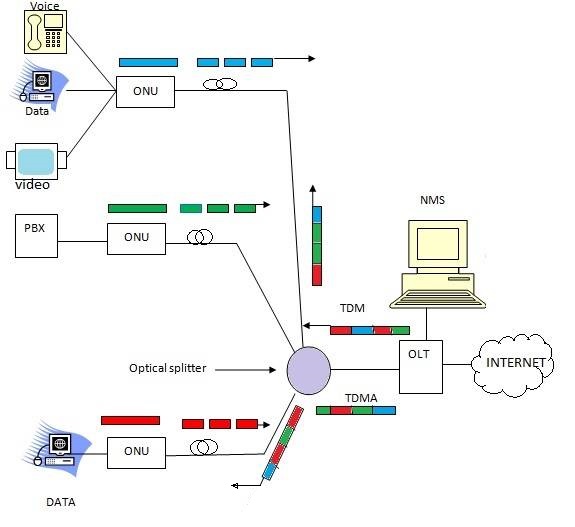
PON
PON ( Passive Optical Network) takes advantage of wavelength division multiplexing (WDM), which means using one wavelength for downstream traffic and one wavelength for upstream traffic on a single fiber.
EPON
EPON stands for Ethernet passive optical network. EPON uses Ethernet packets instead of ATM (Asynchronous Transfer Mode) cells. EPON also uses Internet Protocol (IP) to carry data, voice, and video data. It generally delivers 1G symmetrical bandwidth, which makes it a popular choice.
EPON provides:
- Data rates of 1 Gbps upstream and downstream
- Access to data like Internet, voice, and video service.
- Usable bandwidth: 1 Gbps upstream and downstream
- Reach: Up to 64 ONUs per PON Port
- Subscriber cost: Lower than GPON
- Encryption: Upstream and downstream
GPON
GPON stands for Gigabit Ethernet passive optical network. GPON uses ATM for voice, Ethernet for data, and proprietary encapsulation for voice. It offers faster Gbps than EPON on downstream and upstream bandwidths.
GPON provides:
- Up to 2.5 Gbps
- Usable bandwidth: Up to 2.5 Gbps downstream and upstream
- Reach: Up to 128 ONUs
- Subscriber cost: Higher than EPON
- Encryption: Downstream only
SY-GPON-1110-WDONT Configuration
Unveiling the Future of Connectivity with SY-GPON-1110-WDONT
Introduction
In today’s fast-paced digital world, having a reliable and high-speed internet connection is crucial. As a tech-savvy blogger, I am thrilled to introduce you to the cutting-edge SY-GPON-1110-WDONT, a revolutionary XPON works on EPON as well as GPON (Gigabit Passive Optical Network) Optical Network Terminal that promises to redefine the way we experience the internet. In this article, we will explore the features and benefits of SY-GPON-1110-WDONT and understand why it stands out as a game-changer in the realm of fiber-optic internet connectivity.
What is SY-GPON-1110-WDONT?
SY-GPON-1110-WDONT is an advanced Optical Network Terminal designed to deliver high-speed internet access to end-users through XPON .PON is a fiber-optic communication technology that uses passive splitters in the fiber distribution network, allowing multiple users to share the same optical fiber without compromising on speed and performance. The SY-GPON-1110-WDONT is a powerful and versatile device that brings Gigabit internet speeds to homes and businesses, enabling seamless online experiences for users.
Key Features and Benefits
- Gigabit Speeds: One of the most impressive features of SY-GPON-1110-WDONT is its ability to provide Gigabit internet speeds. With download and upload speeds of up to 1 Gbps, users can enjoy lightning-fast browsing, HD streaming, online gaming, and quick file downloads like never before.
- Stable and Reliable Connection: Thanks to its fiber-optic infrastructure, SY-GPON-1110-WDONT ensures a stable and reliable internet connection. Unlike traditional copper-based connections, fiber optics are immune to electromagnetic interference, making it less susceptible to signal disruptions and latency issues.
- Scalability: SY-GPON-1110-WDONT is designed to accommodate the growing needs of users and network expansion. Its GPON technology allows service providers to extend the fiber network without replacing the entire infrastructure, making it a cost-effective and scalable solution.
- User-Friendly Interface: The device comes equipped with a user-friendly interface that allows easy setup and management. Users can access and customize various settings, monitor network usage, and ensure a smooth and secure internet experience.
- Energy-Efficient Design: SY-GPON-1110-WDONT boasts an energy-efficient design, consuming less power compared to traditional network terminals. This not only reduces operating costs but also contributes to a greener and more sustainable environment.
- Enhanced Security: Fiber-optic connections are inherently more secure than traditional copper-based connections. The SY-GPON-1110-WDONT offers advanced security features, protecting users’ data from potential cyber threats.
Conclusion
In conclusion, SY-GPON-1110-WDONT represents a remarkable leap in the world of fiber-optic internet connectivity. With its lightning-fast Gigabit speeds, stable connection, and scalability, this Optical Network Terminal has the potential to reshape the way we experience the internet at home and in business settings. Whether you’re a tech enthusiast, an online gamer, or a business owner seeking a reliable internet solution, SY-GPON-1110-WDONT is undoubtedly a game-changer worth considering. Embrace the future of connectivity and unlock the full potential of the digital world with SY-GPON-1110-WDONT.
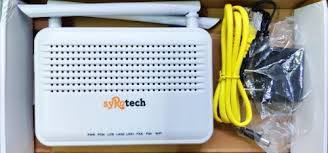
| About | Details |
|---|---|
| Company | syRotech Networks Pvt Ltd |
| Description | Subscriber End Equipment |
| Product Name | G/EPON ONT |
| Default IP Address to open Equipment | 192.168.1.1 |
| User ID | admin |
| Default password | Syro@43210$ |
| Product Mode | SY-GPON-1110-WDONT |
Syrotech ONU Configuration Steps for BSNL
- Open ONT using IP address 192.168.1.1 in your browser
- Enter syRotech default user id as admin and default password as Syro@43210$ to login to ONT
Internet Configuration
- Hover to Network
- Click Internet Connection and select the following
- Connection Name: 1_Internet_R_VII
- Mode: Route
- IP Protocol Mode: Ipv4
- Select PPPoE
- Enable NAT, VAN
- Enter FTTH Username and Password provided by ISP
- Enter Service Name: BSNL
- Enable Port Binding [Port_1, Port_2, WLAN(SSID1)]
WiFi Configuration
- Hover to Network
- Click WLAN
- WLAN Basic
- Band: 2.4Ghz
- Mode: AP (Your circle)
- SSID: Enter your WiFi Name
- Select WMM, SGI
- WLAN Advanced
- Click Off under Different SSID isolation > Apply Changes
- WLAN Security
- Select SSID Type
- Encryption (WPA2 Mixed)
- Authentication Mode as Personal (pre-shared key)
- Select TKIP under WPA2 Cipher Suite > AES under WPA2 Cipher Suite
- 86400 as Group Key update timer
- Select Passphrase under Pre-shared key format
- Enter password under pre-shared key
- Apply Changes
Voice Configuration
- Go to Application
- Click VOIP Configuration
- Select Soft Switch SIP under Server Type
- Enter the values given by your ISP (Primary and Secondary SIP Register and Proxy details)
- Provide your phone number starting with 91 in Account Number and Account Name > Enter password > Click Save/Apply
HG323 XPON ONT Configuration at 192.168.1.1 for BSNL FTTH Voice & Internet
- Login to HG323 XPON ONT in any browser with url 192.168.1.1
- Enter username and passwordusername is admin and default password is stdONU101
- Go to Management > Device Management > Restore default > Restore Factory default
- Click Network > Internet > Delete
- Check Status > Wan Connection info >
WAN info status enabled means, you are ready to browse the internet.
- Click Network > Internet (Add New Connection for Internet)
Mode : Route,
IP Protocol Mode : Ipv4, and select PPPoE,
Enable NAT : Select radio button
Enable Vlan : Enable by select,
Vlan id : Submit the ID provided by BSNL,
Username : Enter BSNL allocated FTTH username followed by @ftth.bsnl.in
Password : password (default)
Service Name : BSNL or which you want,
IP Address: Provide your BSNL allocated IP address,
Port binding : Enable Port 1, Port2 and WLAN (SSID1) by selecting in each box
Click Save - Again Click Network > Internet for Voice ConfigurationConnection name : Add new wan connection,
Mode : Route,
IP Protocol Mode : Ipv4, and select Static,
Enable Vlan : Enable by select,
Vlan id : 1830,
Provide your BSNL allocated IP address, Subnet Mask, Default Gateway, DNS1, DNS2, provided by BSNL
Service Mode : Voice
Click Save - Click ApplicationEnable all the services(ftp, h323, rtsp,ipsec, sip, pptp) in ALG configuration
Save/Apply - Click Application > VOIPSIP registered address : xx.ftthvoip.bsnl.in (first 5 to be filled as xx.ftth.bsnlvoip.bsnl.in)
Select and Enable Outbound Proxy,
Enable Line 1 and enter Account name, Account number, Account password with allotted BSNL FTTH phone number starting with 91 starting by removing 0
Click Save/Apply - Click StatusWAN Information info for both Voice and Internet facilities are enabled or not.
Splicing Machine
Fusion splicing machines, also known as splicing machines, are essential tools for the installation, maintenance, and repair of optical fiber cables. These precision instruments are designed to weld two optical fibers together, a process known as fusion splicing. The splicing machine’s primary function is to ensure a seamless and low-loss connection between optical fibers, enabling the transmission of data with minimal signal attenuation.The process of using a splicing machine involves several steps, including fiber preparation, cleaving, alignment, and fusion. First, the fiber ends are prepared, cleaved, and placed in alignment fixtures on the fusion splicer. The splicer then heats the fiber ends with electrodes, bringing them together and fusing them. This results in a high-strength, low-reflectance splice with minimal power loss. The splicing machine also typically includes features such as automatic identification of fiber type and core alignment methods to ensure accurate and reliable splicing.Splicing machines are widely used in various applications, including the construction, maintenance, and emergency repair of optical cable lines for telecommunications operators, communication engineering companies, and public institutions. They are also utilized in the production, testing, and research of optical devices and fiber optic communication. Additionally, splicing machines play a crucial role in educational and research institutions for teaching and research on optical fiber communication.In summary, splicing machines are indispensable tools for achieving high-quality, low-loss splices in optical fiber cables. Their precision and reliability make them essential for ensuring the seamless transmission of data in telecommunications and other optical fiber applications.


How to Maintain Your Fiber Optic splicing machine?
To maintain a fiber optic splicing machine, follow these tips:
- Clean the V-groove: Regularly clean the V-groove to ensure proper fiber clamping and avoid unnecessary optical loss1. Use a thin cotton swab dipped in alcohol to clean the V-groove
- Clean the entire splicing machine: Wipe the shell of the optical fiber fusion splicer with a rag or wet paper towel to remove dust and dirt.
- Clean the electrodes: Clean the electrodes after 500 times of splicing and replace them after 7000 times of use.
- Inspect the splicing process: Monitor the fusion part of the optical fibers and the electrode discharge during the splicing process. Abnormalities can be due to oxidation of the electrode tip or uneven discharge.
- Maintain a regular routine: Clean the stripper when using 900µm fiber, removing the tight buffer jacket and the 250µm acrylate coating4. Examine the physical groove with a jeweler’s loop at least once per day to remove debris.
- Use proper tools: When cleaning the V-groove, avoid using hard objects that can damage the V-shaped trough3. Use a stiff bristled brush for cleaning the splicing chamber
- Lubricate the stripper: Apply a small amount of lubricant to the stripper when stripping fiber, especially when working with tight buffer jackets
- Monitor the splicing machine: Check the splicing machine for any signs of wear or damage, and make adjustments as needed.
- Consider professional maintenance: Every year or so, have a professional service the fiber fusion splicer to ensure optimal performance and address any potential issues.
- Replace worn or damaged parts: If any parts of the splicing machine are worn out or damaged, replace them promptly to maintain the machine’s performance.
Username Password of Different Brands ONT
Nokia G2425G
Username: AdminGPON
Password: ALC#FGU
comway tplink id password
fusion
fusionnet@135
optivision xpon wirless ont
ID -optivision
-OV@9999
mastr password
OV@9999
stdONU101
richerlink id password
Username = admin
password = admin!@#$
Id:- admin
Password:- ONU@xxxx (xxxx is Last 4 digit of Onu Mac Address In Small letter
Latest UBIQCOM Login
Username: adminubiq
Password: passwordubiq
ubiqcom
Router IP Address-192.168.1.1
Username- excitel
Password-exc@123
siti broadband rauter password
u-SitiNOCeXec
p-$iTi#aDmiN#2022
F1056DV9.0
username – Sitigx
Password – S!ti@gx2021
OLD Model GX ONTs-
SitiAdmin
S!t!NOC@gx21
SPIDERLINK ONT
user-Sp1d3rL1nK
password-Ux1d3bfbT3NpriYa
user-Sp1d3rL1nK
password-UxZdKbfbT3HsAy
UBIQCOM XPON ONU Admin Mode Configuration.
IP Address: 192.168.101.1, Username: adminisp,
Password: adminisp
metro
superadmin
superadminxlp
N4U broadband password
login ip-192.168.1.200
usernaame-adminubiq
password – N4U@1994
TripleplayAdmin
USER : admin
PW : TripleplayAdmin
ANI NETWORK
user-ANIS
pass-qswd!^09DE
ONE BROADBAND
user-SuperONEOTT
password-One#ott@super
Apexbroadband
login ip 192.168.240.1
user- ApexAdmin
pass- Dev_Null>0&2$+
ultranet ont user
user-root
password-E56D68BB
D55D948B
user-ultranet
pass-7399B3B0
nirijanet
nirijanet@123